
Theory of operation
This page explains why RemoteTx sends paddle CW as audio, and how each part of the chain keeps the Morse timing intact from your paddle to the radio's key line.
The problem: CW timing over the Internet#
Morse code is all timing. At 25 WPM a dit lasts 48 ms. If a dit arrives 20 ms late and the space after it arrives on time, the receiving operator hears a different character, or noise.
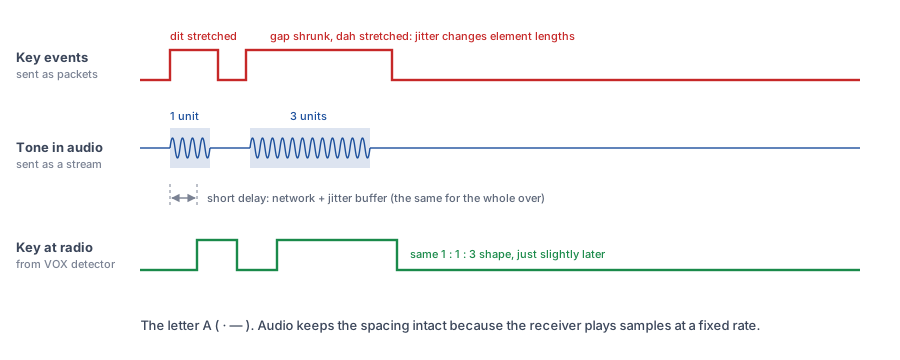
The obvious way to key a remote radio is to send key down and key up messages over the network. That doesn't work well, because Internet packets don't arrive at a steady rate. Each one is delayed by a slightly different amount (this variation is called jitter). The radio would key down when the "down" message arrives and key up when the "up" message arrives, so every bit of jitter goes straight into the length of your dits, dahs and spaces.
The solution: send the CW as audio#
RemoteTx already carries high-quality, two-way audio between your browser and the station for voice operation. Audio is a stream of samples played out at a fixed rate. The receiving end keeps a small jitter buffer: it waits a few tens of milliseconds, then plays the samples back at exactly the rate they were recorded. Network jitter is absorbed by the buffer and doesn't reach the output.
So if your browser makes a tone that is exactly 48 ms long, the station plays a tone that is exactly 48 ms long. It's simply a little later. The whole over is delayed by the same amount, and the dit/dah/space proportions are preserved.
The trade-off is latency, not accuracy. Your sending reaches the air a fraction of a second after you key it. That's why you hear your own local sidetone instantly, and why the radio's own CW monitor comes back to you as a delayed echo (see Mute radio audio while sending).
The fundamental parts#
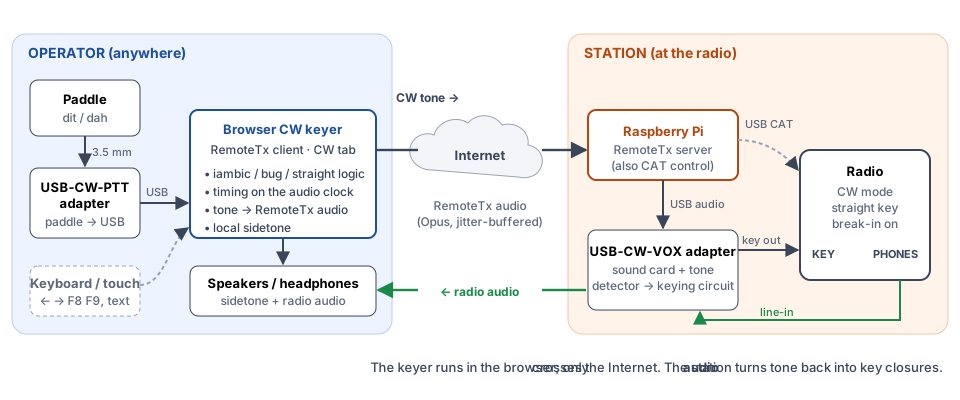
The CW chain has six parts. Each one has a single job:
| # | Part | Location | Job |
|---|---|---|---|
| 1 | Paddle / key | Operator | Two contacts (dit, dah) or one (straight key) |
| 2 | USB-CW-PTT adapter | Operator | Connects your paddle (or straight key) to the computer over USB. Details |
| 3 | Browser CW keyer | Operator (CW tab) | Iambic logic, timing, tone generation, local sidetone, decoder. Details |
| 4 | RemoteTx audio link | Internet | Carries the tone to the station and the radio audio back |
| 5 | Raspberry Pi + USB-CW-VOX adapter | Station | Plays the tone into a tone-detecting key circuit. Details |
| 6 | Radio | Station | Keyed from its KEY jack in straight-key mode; shapes and transmits the RF |
1–2. Paddle and USB-CW-PTT adapter#
Your paddle plugs into the adapter, and the adapter plugs into your computer's USB port. No driver is needed. Each time you press or release a paddle, the adapter tells the browser straight away, and the browser keyer takes it from there.
The adapter reports contacts only. It doesn't time anything or generate dits; all the keying intelligence is in the browser.
3. Browser CW keyer#
The CW keyer is built into the RemoteTx client and runs right in your browser, so there's nothing extra to install. It does everything a hardware keyer does. Its work falls into three parts.
Element logic. It decides what to send next from the paddle state: alternate elements on a squeeze (Iambic A/B), repeat the last-pressed paddle (Ultimatic), automatic dits plus a manual dah (Bug), or pass the key straight through (Straight). Dit and dah memory remember a paddle tapped during the opposite element.
Tone generation. A continuous oscillator is switched on and off to create the CW signals. The keyer has two outputs:
| Output | Goes to | Pitch | Edges |
|---|---|---|---|
| Sidetone | Your speakers/headphones | Tone slider (default 600 Hz) | Always raised-cosine rise/fall (default 5 ms), so it sounds clean |
| TX stream | The RemoteTx audio to the station | 1000 Hz fixed (or the sidetone pitch if SideTone Freq to Radio is ticked) | Hard 0 ms edges by default (Rise/fall to radio unticked) |
The TX stream uses a fixed pitch and square edges because a detector listens to it, not a person. A steady 1000 Hz tone that starts and stops instantly gives the VOX circuit the cleanest possible on/off decision. The radio shapes the actual RF envelope itself from its KEY input, so the transmitted signal is still click-free.
Decoding. Everything you send is decoded back to text in the Sent (decoded) box, so you can check your fist. A separate receive decoder can copy the station's audio.
4. RemoteTx audio link#
The tone is mixed into the outgoing RemoteTx audio in place of your microphone. While Use radio key input (Mute MIC) is ticked, the microphone is taken out of the mix, so room noise, a cough or the radio audio leaking from your speakers can't trigger the station's VOX. The receive direction carries the radio's audio back to you as usual.
Use radio key input (Mute MIC) takes your microphone out of the audio sent to the radio. Untick it on the CW tab before you go back to SSB, FM or AM, or the station won't hear your voice, even though you're transmitting.
The setting is remembered, so it's still on the next time you open RemoteTx, until you untick it.
5. Station: Raspberry Pi and USB-CW-VOX adapter#
The Pi plays the incoming audio out to the USB-CW-VOX adapter, a USB sound card with an added tone-detecting keying circuit. While the CW tone is playing, the circuit keys the radio; when the tone stops, it releases the key line. Its output is wired to the radio's KEY jack, so to the radio it behaves exactly like a straight key being operated by the tone.
The adapter's line input also captures the radio's receive audio (from PHONES) and sends it back to you.
6. Radio#
The radio is set to CW mode with its key input configured for a straight key. With break-in (semi or full QSK) on, closing the KEY line puts the radio into transmit and keys the carrier. All internal keyer functions of the radio stay out of the path, because the browser has already formed the characters.
Timing reference#
The keyer uses the standard PARIS timing: one dit = 1200 ÷ WPM milliseconds.
| Element | Length | At 15 WPM | At 20 WPM | At 25 WPM | At 30 WPM |
|---|---|---|---|---|---|
| Dit | 1 unit | 80 ms | 60 ms | 48 ms | 40 ms |
| Dah | 3 units | 240 ms | 180 ms | 144 ms | 120 ms |
| Space inside a character | 1 unit | 80 ms | 60 ms | 48 ms | 40 ms |
| Space between characters | 3 units | 240 ms | 180 ms | 144 ms | 120 ms |
| Space between words | 7 units | 560 ms | 420 ms | 336 ms | 280 ms |
Weight changes the mark/space ratio. At 50 % marks and spaces are standard. Higher values lengthen every mark and shorten the space after it by the same amount, so the overall speed is unchanged.
Farnsworth applies to typed text and macros only. Characters are sent at the Speed setting, but the spaces between characters and words are stretched to the lower Farnsworth speed.
Any tone detector takes a moment to react at key-down and at key-up. If those two delays are not equal, every element at the radio comes out slightly long (or short). If your signal sounds "heavy" or "light" on a receiver, adjust Weight a few percent to compensate.
Iambic behaviour in detail#
| Mode | Squeeze both paddles | Release during an element |
|---|---|---|
| Iambic A | Alternates dit/dah | Stops after the current element |
| Iambic B | Alternates dit/dah | Sends one extra opposite element |
| Ultimatic | The paddle pressed last repeats | Returns to the paddle still held |
| Bug | Dit paddle = automatic dits, dah paddle = manual key | n/a |
| Straight | Either paddle is a manual key | n/a |
Squeeze latch (default 50 %) decides how forgiving Iambic B is. A paddle that was already held before an element only counts as a squeeze if it is still held at that point in the element. This stops a slightly late release (for example the dit still held at the start of the dah in an A) from producing an unwanted extra element. A fresh press during an element always counts.