
Settings
Click Settings in the top bar. The settings are saved in your browser and apply to every visit. For RemoteTx, only Station needs filling in; everything else is already set up to use the radio connected on the Radio tab.
Station#
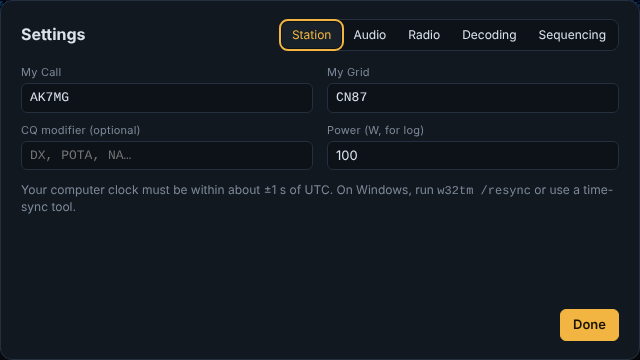
| Setting | What it's for |
|---|---|
| My Call | Your call sign. Required to transmit. |
| My Grid | Your 4- or 6-character Maidenhead locator, e.g. CN87. Sent in Tx1 and Tx6, and used for the bearing compass. |
| CQ modifier | Optional, up to 4 characters: CQ DX, CQ POTA, CQ NA… |
| Power (W, for log) | Recorded in each logged QSO. |
Your computer's clock must be within about ±1 s of UTC. On Windows, run w32tm /resync in an administrator command prompt, or use a time-sync tool such as Meinberg NTP. A clock that's off shows up as large DT values and few or no decodes.
Audio#
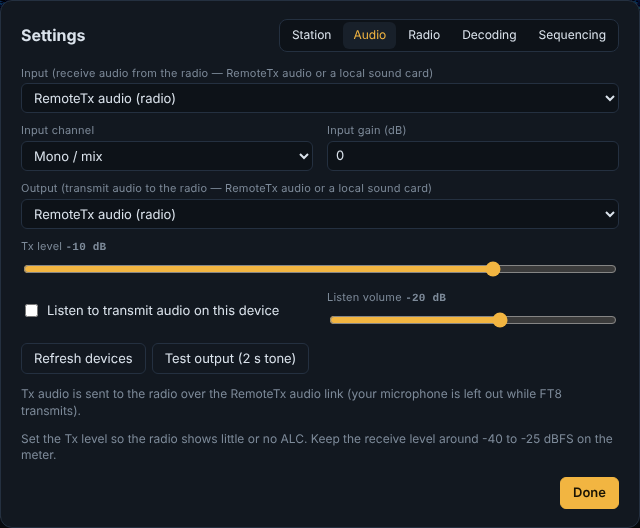
| Setting | Default | What it does |
|---|---|---|
| Input | RemoteTx audio (radio) | Where the receive audio comes from. Leave it on RemoteTx audio for remote operation. A local sound card can be chosen instead (for a radio connected to this computer). |
| Input channel | Mono / mix | Pick Left or Right if your radio puts its receive audio on one channel of a local sound card. |
| Input gain (dB) | 0 | Boosts or cuts the receive level before decoding. Use it to bring the level meter to −40…−25 dBFS. |
| Output | RemoteTx audio (radio) | Where the transmit audio goes. With RemoteTx audio, it's mixed into the outgoing audio in place of your microphone while FT8 transmits. |
| Tx level | −10 dB | Transmit audio level. Set it so the radio reaches full power with little or no ALC. It's the same setting as the Tx level slider in the top bar, next to the ALC meter. The mouse wheel moves either slider 1 dB per notch. |
| Listen to transmit audio on this device / Listen volume | Off / −20 dB | Hear your own FT8 transmissions locally (same as Listen Tx on the main screen). |
| Refresh devices | Re-read the list of sound cards after plugging one in. | |
| Test output (2 s tone) | Sends a 2-second tone to the output, to check the path and level. |
Radio#
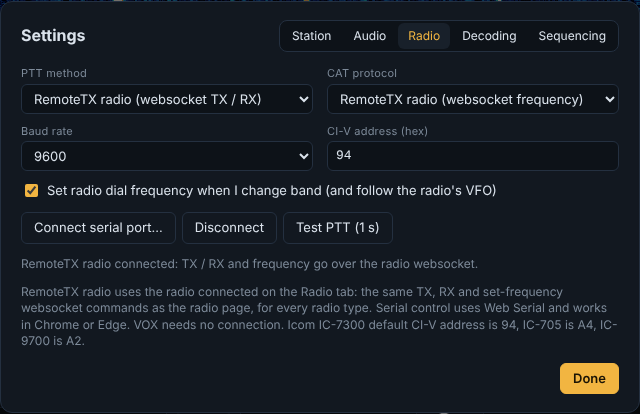
| Setting | Default | What it does |
|---|---|---|
| PTT method | RemoteTX radio (websocket TX / RX) | How the radio is switched to transmit. RemoteTX radio uses the radio connected on the Radio tab, for every radio type. Alternatives for a radio connected to this computer: VOX, Serial RTS, Serial DTR, CAT command. |
| CAT protocol | RemoteTX radio (websocket frequency) | How the dial frequency is set and read. Alternatives: None, Kenwood / Elecraft / FlexRadio, Yaesu newer (FT-991, FTDX10, FT-710…), Icom CI-V. |
| Baud rate, CI-V address | 9600, 94 | Only for serial CAT. Icom IC-7300 = 94, IC-705 = A4, IC-9700 = A2. |
| Set radio dial frequency when I change band (and follow the radio's VFO) | On | Choosing a band tunes the radio, and tuning the radio updates Dial MHz. |
| Connect serial port… / Disconnect | Only for serial PTT/CAT (Web Serial, Chrome/Edge). | |
| Test PTT (1 s) | Keys the radio for one second to check PTT. |
The line under the buttons confirms the connection, e.g. RemoteTX radio connected: TX / RX and frequency go over the radio websocket.
Use Test PTT and then Tune (on the main screen) into a dummy load or at low power the first time, and watch the radio's power and ALC.
Decoding#
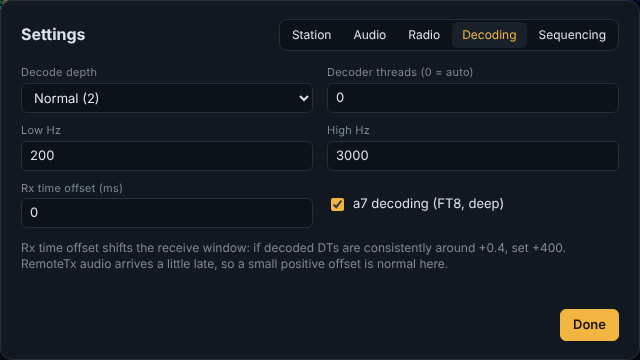
| Setting | Default | What it does |
|---|---|---|
| Decode depth | Normal (2) | Fast uses the least CPU; Deep digs out the weakest signals. |
| Decoder threads | 0 (auto) | How many CPU threads the decoder may use. |
| Low Hz / High Hz | 200 / 3000 | The part of the passband that's decoded. |
| Rx time offset (ms) | 0 | Shifts the receive window. RemoteTx audio arrives slightly late, so if decoded DT values are consistently around +0.4, set +400. |
| a7 decoding | On | Extra FT8 decoding pass using the previous period's messages. Used at Deep depth. |
Sequencing#
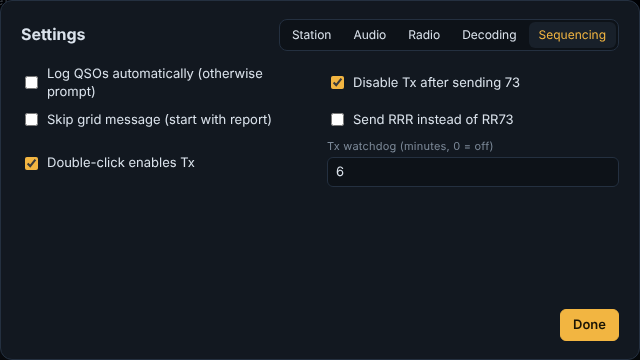
| Setting | Default | What it does |
|---|---|---|
| Log QSOs automatically | Off | Off: the Log QSO form opens at the end of each QSO for you to confirm. On: QSOs are logged without asking. |
| Disable Tx after sending 73 | On | Turns Enable Tx off after you send 73 (Tx5). Not during a Queue Multiple Callers run, which carries on with the next caller or a CQ. |
| Skip grid message | Off | When calling a station, start with the report (Tx2) instead of your grid (Tx1). |
| Send RRR instead of RR73 | Off | Tx4 sends RRR and waits for their 73. |
| Double-click enables Tx | On | Double-clicking a decode also turns on Enable Tx. |
| Tx watchdog (minutes) | 6 | Turns Enable Tx off if you haven't touched anything for this long, so a forgotten CQ doesn't run for ever. Automatic QSOs (Auto Answer on CQ, Queue Multiple Callers) don't reset it. 0 = off. |
There's no late-start setting. As in WSJT-X, if Tx is enabled or a station is called during your own period, it transmits straight away, trimmed at the start, as long as you're less than three-quarters of the way in (11.25 s for FT8, 5.6 s for FT4). Switching to another message or station while transmitting happens at once, at any point. See Switching to another station.
The Queue Multiple Callers options are on the main screen, under Auto Answer on CQ: see Queue Multiple Callers.